PTest Cases
Take a read at PTest Software Stack before looking at this page. Once you do, you know that USBSession is the core of how a user interacts with flight software instances. The state command prompt provides a manual way to read and write state from flight software; ptest cases provide a powerful, Python-based, automated way to transact state fields. This allows for the creation of automated simulations and testcases on our spacecraft.
See below for an inheritance diagram of the ptest case base classes:
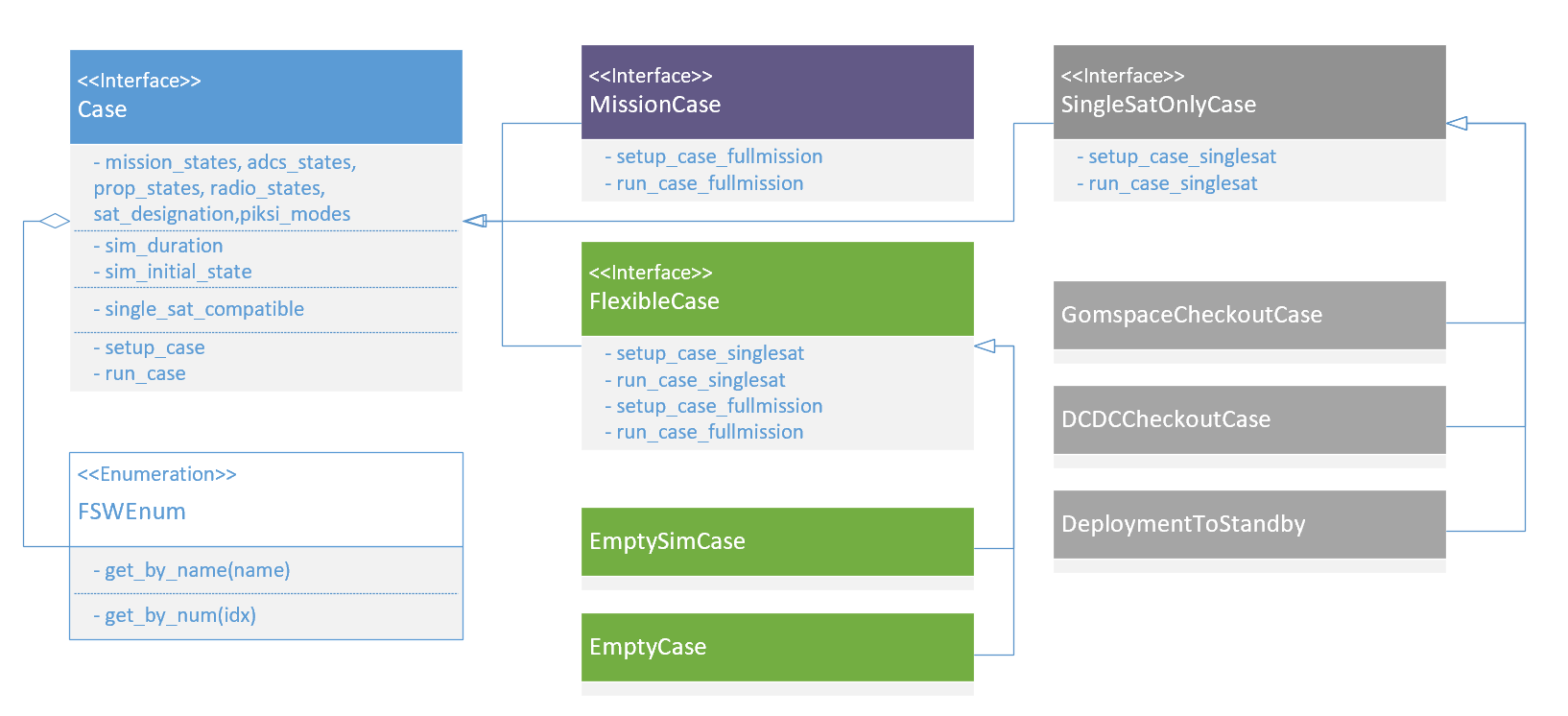
Diagram depicting the relationship between the base classes of ptest cases.
Writing a PTest Case
Is as simple as inheriting from either SingleSatOnlyCase or MissionCase, as diagrammed above.
These base classes contain some utilities for reading and writing state to either 1 or 2 satellites,
respectively.
The base ptest class also exposees a set of FSWEnum objects which create dual-indexing of common flight software enums (like mission state, ADCS state, etc.) by both name and numerical value. See the example below of how you can set the satellite mission state to “manual”.
Examples of writing a state field through a ptest case derived from SingleSatOnlyCase:
self.ws("pan.state", self.mission_states.get_by_name("manual"))self.ws("dcdc.ADCSMotor_cmd", True)self.ws("adcs_cmd.rwa_speed_cmd", [0,0,0])self.ws() accepts the statefield name and a int, float, bool, or a list of them.
Examples of a reading state field through a ptest case derived from SingleSatOnlyCase:
self.rs("adcs_monitor.mag_vec")self.rs("adcs_cmd.havt_reset0")self.rs() returns the proper type of variable associated with each state field.self.rs("adcs_cmd.rwa_speed_cmd") returns a list of floats.Listing of Ptest Cases
ADCSCheckoutCase
The ADCSCheckoutCase
Initialization
Sets the mission state to
manualSets the ADCS state to
point_manualSet the RWA mode to
RWA_SPEED_CTRLSet the intial RWA speed command to
[0,0,0]Turn on the ADCS Motor DCDC.
HAVT Checkout
The HAVT checkout begins by resetting all devices on the ADCSC.
It then pattern matches the read HAVT table with existing cataloged test-beds. If no match is found, the user is alerted.
Then all devices are disabled and reset, to make sure the devices are all properly cycled, and returned to the initially read HAVT table.
MAG Checkout
The checkout case pulls ten readings from the mag, cycle() ing the FC between each reading.
It checks to make sure the readings change over time,
and that the magnitude of the readings are reasonable
(within expected earth magnetic field strength expectations).
MAG Independence Checkout
If both magnetometers are functional, this test section will disable MAG1, and check that MAG2 still works. The same checkout is performed on MAG1 with MAG2 disabled. The independence checkouts re-run the same checkouts as above.
GYR Checkout
The checkout case pulls ten readings from the gyro, cycle() ing the FC between each reading.
It checks to make sure the readings change over time, and that the magnitude of the readings are reasonable.
Wheel Checkout
The wheels are put into RWA_SPEED_CTRL and it checks that the speed read is reasonably close to
the speed read for a series of tests.
The wheels are then put RWA_TORQUE_CTRL and it checks that the torque read is close to the actual
torque read for a series of tests.
SSA Checkout
Each Sun Sensor is polled for its voltage, and the sum_of_differentials method is used to check that
the sensors change over time. Alternatively it is just manually inspected.
TODO FURTHER CHECKOUTS
PiksiCheckoutCase
The PiksiCheckoutCase continuously reads data from the Piksi device.
It first performs a series of 10 readings for the user to glimpse at the data coming in. Then a series of 100 readings are performed. It checks to make sure that the most common mode of return is a nominal one or a nominal combination.
If not a TestCaseAssertion is thrown, indicating that the Piksi is likely not functioning as intended.
For each vector that is available, it that the vector changes with time, and that the magnitude of the entire vector is within expected bounds.
Position should be within 10 km of 6371 km. Velocity is within 4 m/s, and that the baseline vector is within 100 m.
The user must then check that the Piksi is functioning as expected from the diagnostic data given the condition of the test bed.
Deployment to Initialization Hold Checkout Case
This checkout case confirms that, if the satellite is deployed and all the ADCS devices are functional, then the
satellite will move to detumble. If the satellite is deployed and if one or more of the ADCS devices are not functional,
then the satellite moves to initialization hold.
First, the checkout case moves the satellite to startup and waits the full deployment period. Then, the checkout
case tests each of the following scenarios:
All ADCS Devices are functional: The case unsignals all the listed faults and checks that the satellite moves to
detumble.ADCS is not functional: This fault could occur if I2C communication between the flight computer and the ADCS fails. The checkout case will signal the
adcs.functionalfault and check that the satellite moves toinitialization_hold.ADCS Wheels 1-3 are not functional: The ADCS wheels allow the satellite to adjust its orientation in space. The case will trip each of the ADCS wheel faults, one-by-one, and check that the satellite moves to
initialization_holdeach time.ADCS Potentiometer is not functional: The ADCS potentiometer is a variable resistor that controls the torques that the motors operate with. The checkout signals
adcs_monitor.wheel_pot_faultand checks that the satellite moves toinitialization_hold.
DCDC Checkout Case
The DCDC checkout case verifies that we are able to control the values of the DCDC pins: ADCSMotorDCDC_EN, which brings power to the
ADCS system, and SpikeDockDCDC_EN which brings power to the propulsion and docking systems. The checkout case also verifies that we
can reset and disable these pins from the ground.
GomspaceCheckoutCase
The GomspaceCheckoutCase tests the readable state fields read from the Gomspace and compares them to the expected values from its datasheet and manual. The case also tests that writable fields can be properly set and that powercycling is successful. The test case will log any incorrect or unsuccessful reads/writes.
DockingCheckoutCase
The DockingCheckoutCase is meant that we can write and read to the docking system’s state fields, and in HITL is also meant to test that the motor turns the expected amount with the currently set values for step angle and delay.
The test case logs the state of all the fields as it runs. It first checks that the configuration is undocked in the undocked magnet configuration and not turning, and that the configuration is commanded to be in the docked position. The initial step angle and delay are verified, and then the system is sent the command to undock and then to dock again. Then, the step angle and step delay are written to different values and the process is repeated. There should be a noticeable difference in speed, but overall each dock and undock command should take around a minute.